Custom post types, archives and taxonomies PRO
PRO feature
Free scans posts and pages only. Pro widens coverage to the rest of your site.
Custom post types
Under Settings -> Scanner, the Post types to include in full-site scan setting lists your content types as checkboxes. Free scans Posts and Pages; Pro lets you tick any registered custom post type too (for example WooCommerce products). Ticked types are walked by the normal full-site scan and counted together with your posts and pages.
Archives and taxonomies
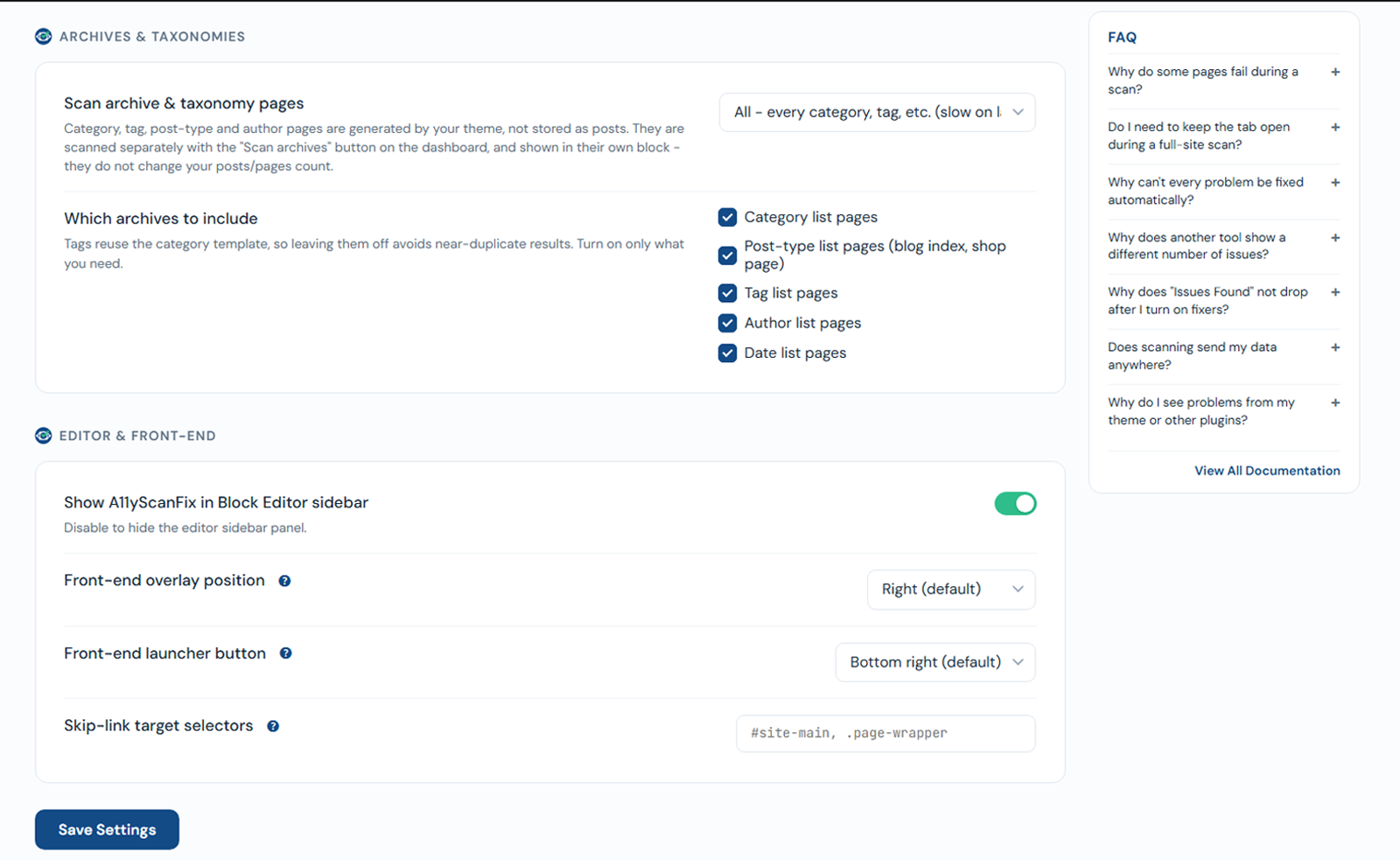
Archive and taxonomy pages (category, tag, post-type, author, date archives, and WooCommerce product categories / tags) are generated by your theme, not stored as posts. They are scanned separately, shown in their own Archives & taxonomies block on the dashboard, and do not change your posts/pages count.
Under Settings -> Scanner, the Scan archive & taxonomy pages dropdown sets the mode:
- Off
- Sample - one page of each kind (recommended) - one representative page per enabled kind.
- All - every category, tag, etc. (slow on large sites).
You also tick which kinds to include (default in brackets):
- Category list pages (on)
- Post-type list pages - blog index, shop page (on)
- Tag list pages (off)
- Author list pages (off)
- Date list pages (off)
- Product categories and Product tags - shown only when WooCommerce is active (off)
Run them with the Scan archives button in that dashboard block.